Section
The Section dock cuts through the current 3d cell for viewing. The model is not changed: only the OpenGL display is clipped. The cut face is filled with the layer colours, so the interior of a volume stays visible. This dock is available from release 20260825.
It lives in the 3d editor window, not in the 2d 3d-generation dock (Extrude, Process, Model). Open or hide it with View → Section.
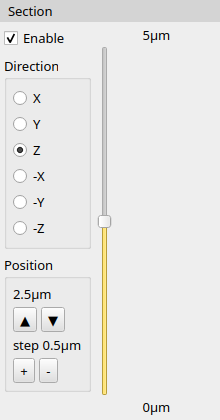
Enable
The clip is off until Enable is checked. Moving the position slider or the step buttons turns Enable on automatically.
Direction
One axis-aligned plane. The radio button chooses which half of the model stays on screen:
| Direction | Kept side |
|---|---|
| X, Y, Z | coordinates less than or equal to the position |
| -X, -Y, -Z | coordinates greater than or equal to the position |
Z is the default. Changing the direction updates the slider range to the bounding box of the current cell on that axis.
Position
The vertical slider runs from the minimum to the maximum of the cell on the chosen axis (shown in the 3d user units). The value next to the slider is the current plane.
The up / down buttons move the plane by the current step. + / - change the step on a 1–2–5 scale (for example 0.1 µm, 0.2 µm, 0.5 µm, 1 µm), limited so that at least about ten steps fit the range.
This live clip is not the same as the 2d cross-section drawing used to fill the 3d layer settings.
© 2026 juspertor GmbH