Language Models
Add a model
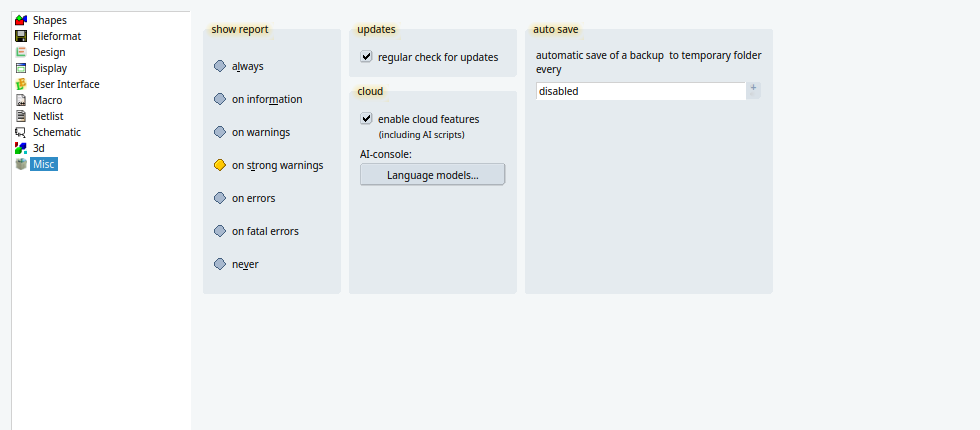
The console can talk to a language model you already pay for, or to one that runs on this computer and never calls a provider. Open the setup dialog from the toolbar or from Utilities, choose Misc, and in the group cloud press Language models…. The button is available while enable cloud features is on. The gear in the AI Console opens this same Misc page.
The dialog is titled Language models and starts with the line These models are available. LayoutEditor is always in the list and cannot be removed.
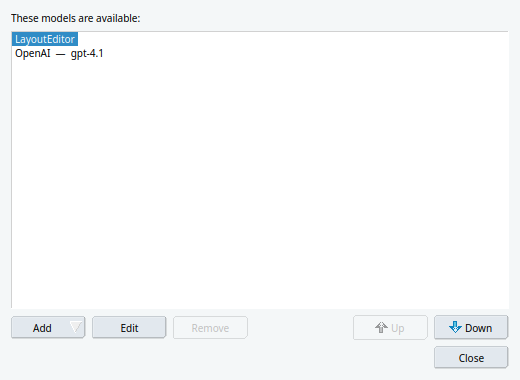 Press Add and pick a provider. The dialog Language model opens with the address and a suggested model already filled in. Edit changes an entry. Remove deletes one you added. Up and Down change the order of the names in the console. Close the dialog when the list looks right, then pick the new name at the bottom of the AI console.
A full license is required for these models. Without it the console says that direct language models need a full license.
What to fill in
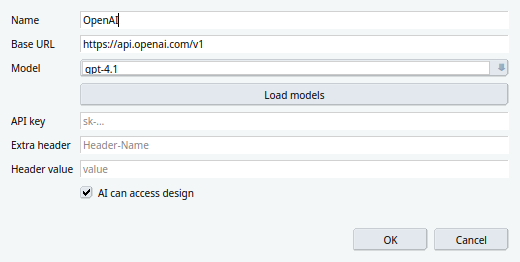
Name is the label in the console. It can be anything you will recognize. It does not have to match the provider.
Base URL is the front door of the service. Leave the address that Add already inserted, unless your provider told you a different one. The program talks to that address plus /chat/completions.
Model is the id of one model at that address. The suggestion is a current chat model and is fine to keep. Load models asks the server for its list, drops models that only make audio, images or embeddings, and puts newer chat models first. The list stays editable, so a name you type yourself is kept even if the server did not offer it. If Load models cannot reach the server, type the id from the provider’s own model list.
API key is the secret the provider gave you. It is saved in the LayoutEditor settings on this computer, obfuscated, and it is not written into the design file or into the chat. After it is saved, the field shows a hint instead of the key. Leave the field empty when you edit the entry later if the saved key should stay. Local and Custom do not require a key.
Extra header and Header value stay empty for most providers. Anthropic rejects the request without them: set the header name to anthropic-version and the value to 2023-06-01. OpenRouter may take an optional HTTP-Referer such as https://layouteditor.org. The header value is stored the same way as the key.
| Add | Address already filled in | Model already filled in | Key |
|---|---|---|---|
| OpenAI | https://api.openai.com/v1 | gpt-4.1 | required, from platform.openai.com |
| Gemini | https://generativelanguage.googleapis.com/v1beta/openai | gemini-2.5-flash | required, from aistudio.google.com/apikey |
| Anthropic | https://api.anthropic.com/v1 | claude-sonnet-4-5 | required, from console.anthropic.com, plus the header above |
| Grok | https://api.x.ai/v1 | grok-4 | required, from console.x.ai |
| DeepSeek | https://api.deepseek.com | deepseek-chat | required, from platform.deepseek.com |
| OpenRouter | https://openrouter.ai/api/v1 | type or load one | required, from openrouter.ai/keys |
| Local | http://127.0.0.1:11434/v1 | type or load one | none for Ollama on this computer |
| Custom | you type it | you type it | only if that server asks |
Whether the model may see the design
The last box in the dialog is AI can access design. When you press Add, this box is checked. Clear it before you press OK if this model must not be told about the layout.
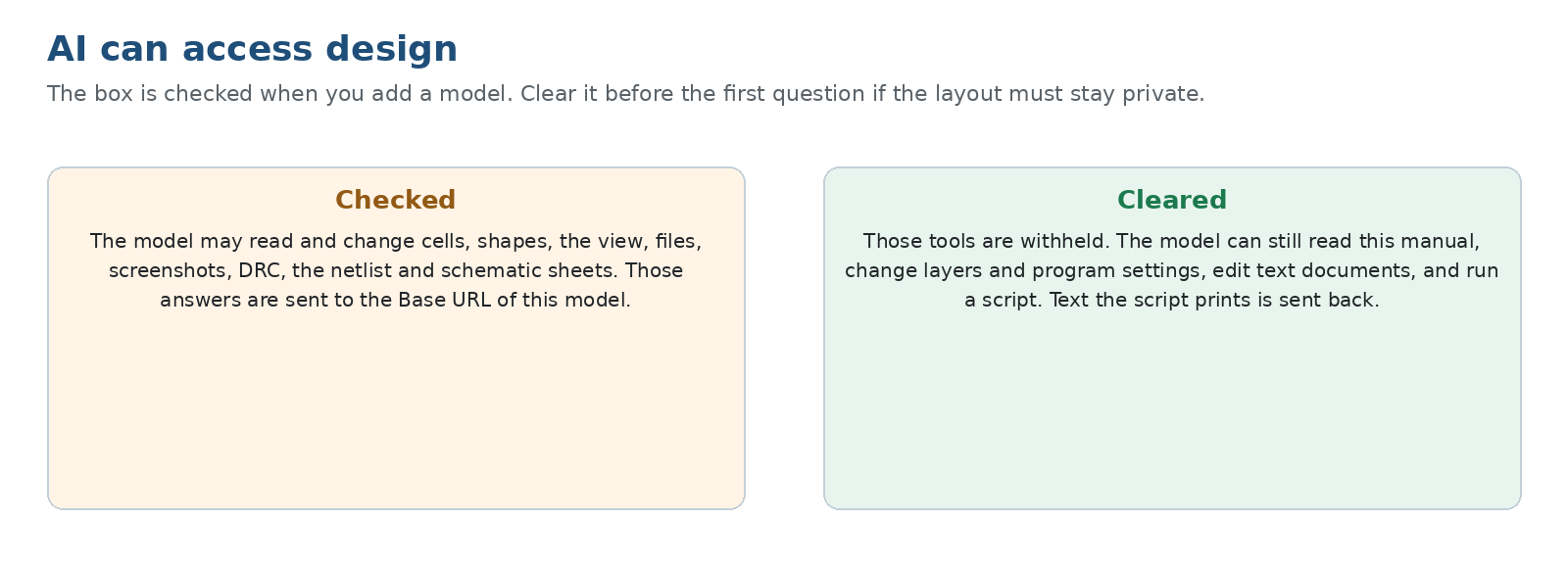
Checked, the model may read and change the open layout and schematic: cells, shapes, the view, files, screenshots, DRC, the netlist and schematic sheets. Each of those answers is sent to the Base URL of this entry. That is useful when you want the model to draw, measure or check the design you have open. It is the wrong setting when that design must not leave the building, unless the Base URL is a program on this computer, as described below.
Cleared, those tools are withheld. The model can still read this manual, read and change layers and program settings, read and change text documents, and run a script. The script runs on this computer. Text the script prints is sent back to the model. A script that lists coordinates will therefore send those coordinates. Leave the box cleared and do not ask the model to inspect the layout when that text has to stay local.
The LayoutEditor entry shows the same box, grey and off. That assistant only sees the chat and returns a script.
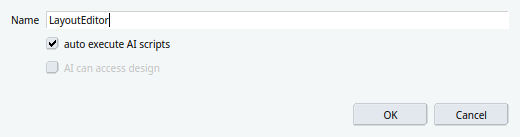 It cannot use the design tools. Auto execute AI scripts on that entry decides whether the returned script runs at once or waits for Execute Script. Other models do their work through the tools above, and this switch does not apply to them.
A model on this computer
Add and Local point at http://127.0.0.1:11434/v1. That address is the usual door of Ollama, a program that runs a model you have downloaded and answers on this machine. No key is required for Ollama. Start Ollama, download a model in it, then either type that model’s name or press Load models once Ollama is running. Pick the new name in the AI console.
The LayoutEditor sends the chat only to the address in Base URL. While that address stays on 127.0.0.1, the text goes to a program on this computer and not to OpenAI, Google or any other provider. Change the port if your program listens on another one. If you replace 127.0.0.1 with the name of another computer, the chat goes there instead. The LayoutEditor does not control what that program does afterwards. A local server that forwards the text would send it on. One that only answers locally keeps it here.
With the address on this computer you can leave AI can access design checked and still keep cells, screenshots and the netlist off the public network. Clear the box as well if you want the local model to answer questions without reading the design.
© 2026 juspertor GmbH